Layered Character Templates
A Layered Character Template is a Scriptable Object used to create Layered Characters at runtime.
It Acts as a resuable blueprint that defines:
- The Character Type asset the character will use
- The default name assigned when a character is created
- The Layer Option used for each layer of the character
Workflow Overview
- Create a Layered Character Template asset
- Assign a Character Type
- Set the default name
- Choose Layer Options for each layer
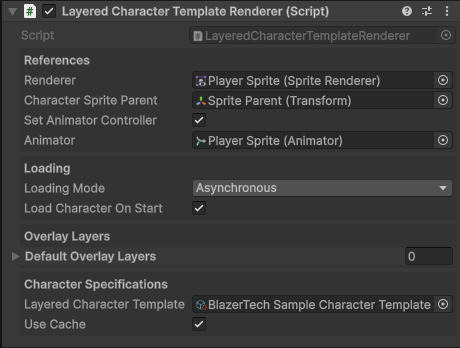
- Attach the template to a Layered Character Renderer component
The template can now be reused to consistently generate the same layered character every time.
Setup
Create
To create a Layered Character Template right click the Project window and navigate to
Create > BlazerTech > Character Management System > Character Templates > Layered Character Template.
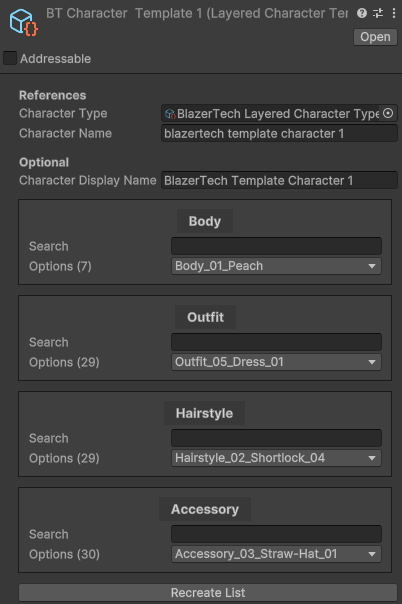
Character Type
Assign the Character Type asset that all characters created from this template will use.

This is used to determine:
- The available layers of the character
- The available Layer Options for each layer.
- The Animator Controller used to animate the character
Default Character Name
Set the default name assigned when a character is created from this template.
You may also optionally set a Display Name for use alongside created characters in-game.

Select Layer Options
When a Character Type has been assigned, a list of layers appears.
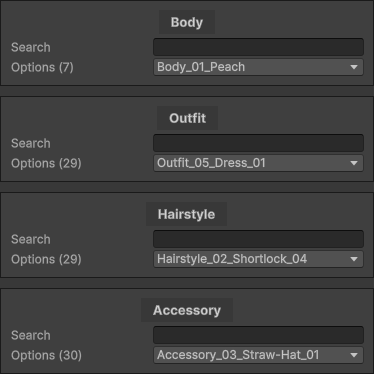
Each entry respresents a layer defined in the Character Type.
Each layer has an assigned Layer Option which is the spritesheet used for that layer.
You can change the Layer Option used for each layer here.
A dropdown shows all available options and the search bar can be used to narrow down results.
When a character is created from this template, all selected Layer Options are applied automatically.
Runtime Usage
Once the Character Template is setup it can be assigned in a Layered Character Template Renderer component which at runtime will create a character from the template and animate it using the Animator Controller assigned in the Character Type.