Character Display Name Renderer
Provides an easy way to show the Display Name of a character in-game.
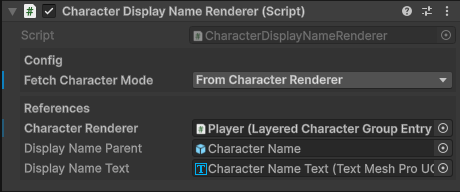
Config
Choose how you'll get a reference to a character. There are two options:

From Character Renderer
Uses a Character Renderer component to find a character.
Assign a reference to a Character Renderer component.
When the Character Renderer component loads a character:
- The Display Name Renderer will be notified and retrieve the character.
- The display Name Renderer will get the Display Name of the character and set the text of the assigned text component to the characters display name.
From Character Group
Attempts to find a character from a character group at runtime.
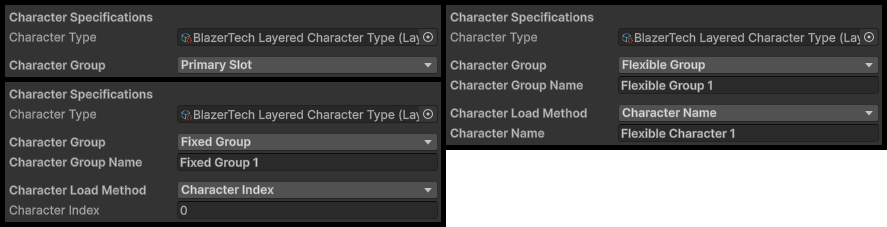
Assign Character Type
Assign a Layered Character Type asset.
This will be used when looking for a character group.

Set Character Group Type
Choose the type of group you want to load from.
| Group Type | Description |
|---|---|
| Primary Character Slot | A single character attached to the Character Type asset. No additional parameters required. |
| Flexible Group | A group of characters that can be added, removed, or edited at any time. |
| Fixed Group | A group with a preset number of characters. New characters cannot be added or removed after creation. |
If Flexible Group or Fixed Group is selected, the following parameters are required:
| Parameter | Type | Description |
|---|---|---|
| Character Group Name | String |
A unique name used to find the Fixed or Flexible group. |
| Character Load Method | Enum |
Determines how a character is selected from the group: - Character Name > Load a character by its saved name. - Character Index > Load a character by its index position in the group. - Randomized > Randomly load a character from the group. |
References
| Field | Type | Description |
|---|---|---|
| Display Name Parent | GameObject |
Parent GameObject used to disable text when Display Name is blank. |
| Display Name Text | TMP_Text |
Reference to a TMP Text component used to render the Display Name text. |

Tip
Use a canvas with a Render Mode set to World Space. This lets you display UI elements within the world. In this case it'll sit on top of the character and follow along with it.