Random Layered Character Renderer Component
The Random Layered Character Renderer creates a new completely randomized Layered Character at runtime by selecting a random Layer Option for each layer of the character.
Note
This component contains no options for controlling how the character is randomized. For advanced character randomization use a Randomized Layered Character Template.
This component is responsible for:
- Creating a random layered character
- Applying the Character Shader
- Assigning the Animator Controller (Optional)
- Managing Overlay Layers
Requirements:
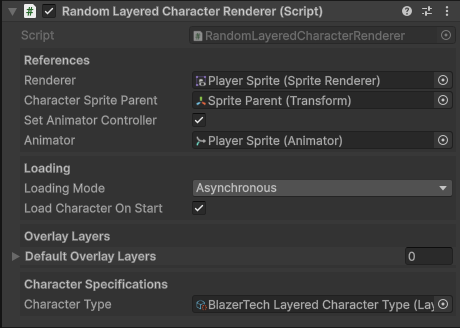
Quick Setup Overview
Quick overview of how to setup the Random Layered Character Renderer component.
- Add the component to a GameObject.
- Assign Renderer (Usually a Sprite Renderer).
- optionally assign Animator.
- Configure Loading Settings.
- Assign the Layered Character Type you want to use.
- Play your game and if Load Character On Start is enabled, a new completely randomized character will be displayed.
Setup
Full step-by-step guide to setup the Random Layered Character Renderer component.
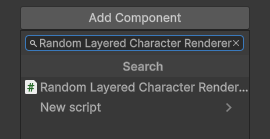
Add Component
Add the component to a GameObject by clicking Add Component in the inspector window.
Assign Renderer Component
Assign the component responsible for rendering the character's sprites.
In most cases, this will be a Sprite Renderer. The Character Shader will be applied to this renderer.

Assign Animator Component (Optional)
If your Character Type asset includes an Animator Controller, it can be applied automatically when the character is loaded.
To enable this:
- Enable
Set Animator Controller. - Assign the target Animator component.

Configure Loading Settings
The Loading Mode determines how the character is loaded at runtime. This can significantly impact performance.

| Loading Mode | Description | Advantages | Cons |
|---|---|---|---|
| Asynchronous | Loads the character in the background. | No frame stutters or freezes. | Character is temporarily invisible while loading. |
| Synchronous | Loads the character on the main thread. | Character is immedietely renderered the same frame. | May cause frame stutters depending on spritesheet size. |
Recommended Usage
- Use Asynchronous loading for background NPCs or characters that aren't time sensitive.
- Use Synchronous loading when the character must appear Immediately, such as a player character.
Load Character On Start
If Load Character on Start is enabled, the character is automatically created and rendered during the Start() method
If disabled, the character must be loaded manually through script using the GetAndShowCharacter() method
Assign Character Type
Assign a Layered Character Type asset.
The renderer will create a randomized character using the Character Type asset you assign.

Hit Play

Enter Play Mode.
If Load Character On Start is enabled in Loading Settings, the character will be automatically created and displayed.